Subscribe by Email

Your email:

Current Articles | RSS Feed RSS Feed

Ever-evolving Pageflex - Releases version 7

Posted by Paul Hornbeck on Wed, Aug 05, 2009 @ 05:05 AM
Share on Facebook Facebook | Submit to Digg digg it |  Add to delicious  delicious |  Submit to StumbleUpon StumbleUpon |  Share on LinkedIn LinkedIn |  Share On Technorati Technorati | Submit to Reddit reddit 

While I try not to focus on one particular subject or promote a specific item in my blogs, I feel compelled to dedicate this blog to the new and rich features made available in the version 7 release of the Pageflex software. This release is full of a great variety of improvements and completely new features that it just screams "blog me!".

If you ask a Pageflex representative what's new in the version 7 release, they might form their answer around the new Adobe InDesign integration. There is now available a Pageflex plug-in to InDesign CS4 that offers pallets similar to what you have seen in PF Studio. This Studio ID plug-in alone moves InDesign closer to Variable Data more than anything in the past. With this plug-in, you can output directly from InDesign to PostScript, PDF, PPML, or JPEG files. The plug-in is available in both Windows and Mac OS formats.

What if you want to take those InDesign files to your Storefront? That, too, is a new feature available in version 7 - Server ID. Implementation of this basically puts an InDesign Server engine under the hood of Storefront as its composition engine - by itself or in addition to the traditional NuDoc engine. Storefront users see no difference in the workflow. They'd be hard pressed to know if the file was from InDesign or Studio - exactly what you want.

Indeed the integration of Pageflex and Adobe products combining to make a unique and powerful solution are worthy of applause, but there is much more in the mainline Pageflex release than that.

Storefront probably inherits the majority of accolade in features obtained in the new release. These features include:
- Ability to drag items in a list up or down (rather than having to click the up/down arrow until you're blue in the face)

- When users need to select an image from a Image Choice, select a datalist, or other action that requires another window, instead of opening a new window, they're now faced with a nifty floating palette

- You now have the ability to remove users, orders, assets, and even deployments in Storefront

- One can now schedule a task to remove Storefront logs (we presume other scheduled tasks may be on the way)

- There are improvements in skinning, specifically in the area of "Inserts" that can be added to more steps than the previous releases

- There are new Pop-up controls in Storefront and Campaign Manager

- Another great feature is the ability to schedule when a Campaign can be mailed in Campaign Manager

- V7 offers a change in the way Pageflex generates PDF files - still using Adobe libraries, but with more Adobe Distiller-like capabilities

- If you're a Storefront administrator like myself and dislike using Internet Explorer, V7 will now let you use Firefox and Safari for these tasks. Chrome users, stand-by

- Several API, Document Actions, programming features, and extensions have been added or improved upon

Of course there are more features and enhancements but the above list would hopefully make you salivate to know more. It's always encouraging to see vendors address customer and client needs and I believe Pageflex has made another step in the right direction with this release.


0 Comments Click here to read/write comments

Xinet Suite-16 Has A Sweet Interface

Posted by Robert Sullivan on Fri, Jul 17, 2009 @ 10:33 AM
Share on Facebook Facebook | Submit to Digg digg it |  Add to delicious  delicious |  Submit to StumbleUpon StumbleUpon |  Share on LinkedIn LinkedIn |  Share On Technorati Technorati | Submit to Reddit reddit 
Tags: , , ,
We've been working with Xinet's newest upcoming version release, Suite 16,
and I'm telling you, it is sweet! Aside from the video excitement that Brian talked
about, there are a lot of cool developments in Suite 16.

All of the administration tools from FullPress and WebNative Venture are all in one
web based GUI. The old Java GUI for FullPress will still be available in Suite 16,
but I don't think it will be developed beyond that. Once you get use to the new web
base admin, you'll toss that old interface like yesterdays newspaper anyway.

There are three control bars in the new interface and the top row has six control
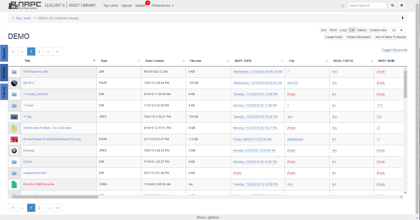
categories. You can see in the two screen captures below that as I change the top
row category, the next two rows will change and give you access to all of the pertinent
settings for that selection. It's very well thought out were simple things like the
Volumes/User category also gives you the Venture Permission settings to assign.


As an administrator I think the "Logging" category is the big boom, no-brainer.
All of the logs that were scattered about before are now under one button. Xinet has
also added some more views to information that users are always asking about.
'Preview Generation' will now show you what is in the pipe line as far as how many files
are being processed. So if a user dumps 25 movie files and 71 images into the system,
you can see the numbers of what is processing, waiting or holding. Helping to take the
guess work out of, what is my system working on.

There's a nice feature for importing any existing custom XMP panels you may have also.
What was a manual process of adding one field at a time is now a batch in the interface.
If you have custom XMP panels within your Adobe programs you can now import them into
the Venture database very easily. Drop your panel in and select which data fields you'd
like in Venture, create it's own Data Field Set on the fly, and even determine which
fields you'd like to be XMP writable. Submit and it's done. All of those custom data
fields are now available to put into your data templates.

There's a lot more in here too. We'll be talking a lot about new features and I'm sure
NAPC will be holding a Webinar or two as the release date draws near. I think when you
see it, you'll agree with me, Xinet Suite 16, is pretty sweet!

-Sully
  

0 Comments Click here to read/write comments

New Video featues in Xinet v16

Posted by Brian Dolan on Fri, Jul 03, 2009 @ 07:29 AM
Share on Facebook Facebook | Submit to Digg digg it |  Add to delicious  delicious |  Submit to StumbleUpon StumbleUpon |  Share on LinkedIn LinkedIn |  Share On Technorati Technorati | Submit to Reddit reddit 

As the Holiday weekend starts up for us all, lets close the week out and chat a bit about all the cool things that are coming to the masses soon.  Xinet is going to be releasing version 16 of it’s suite of tools including a new, faster version of Portal, a unified web interface for all administration, easier tools and setup for PDF Image replacement, greatly enhanced video capabilities, basic web based markup and annotation tools and a whole bunch of other “under the hood” improvements.  Currently, NAPC is testing beta 2 of version 16 and we’re all pretty impressed with it so far.  One of the biggest features I’m excited about is the enhanced video features.  Let me esplain (as Ricky would say).


Xinet, in the new soon to be released version of video in Suite 16, has greatly enhanced how users in Portal interact with video assets.  In the current release of Video 2.0 in Xinet, it is possible to stream many video formats, create keyframes at a preset interval, and really, thats about it.  With the new version, you’ll be able to do much, much more.  First and foremost, the ability to create what I would call mini-reels, is now available as a basket plugin in Portal.  This is how it works:


1)    User logs in to a Portal site and identifies the files they want to work with.  Those files could be video files of various formats, InDesign files, static picture files, just about anything you can have in Xinet.
2)    The user would then add those files to a shopping basket.
3)    Once in the basket, the user would click the basket plugin named “Video Generation”
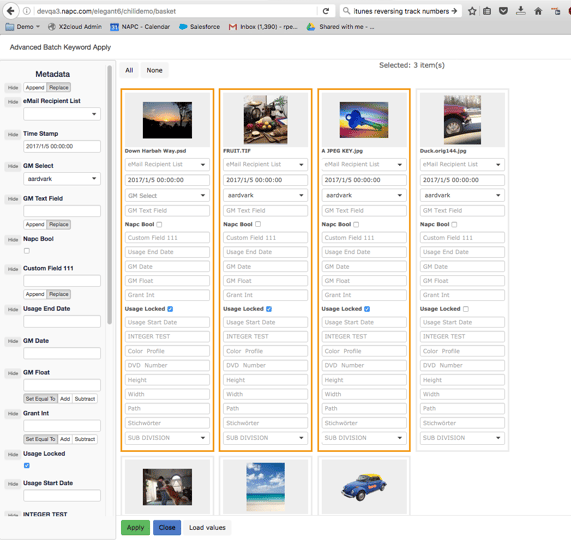
4)    This brings up a new Web 2.0 type of interface to arrange the assets into whatever order makes sense to the end user.  Asset arrangement is made simple by using drag and drop in a web browser-me likey!
5)    Once in the correct order, the user can set the ‘in and out’ times of the files based on keyframes generated by Xinet or by hours:minutes:seconds.
6)    The user can also set basic fade outs from clip to clip as well.  Gives it a nice touch!
7)    Once the files are arranged in the correct order and the in/out times are set, a new video file can be generated from those assets in either a Quicktime, Windows Media, or Flash format.
8)    The server then generates the appropriate file on the Xinet file system and once done, it gives the end user the ability to download the file to their desktop.

Here's a peek of what it'll look like:


This is huge everyone.  Think of it this way, if you have 30 second spots for a client for all of 2008, and they want to create a quick reel of all the ones that won awards (that you made of course!), they can quickly log in to Xinet via Portal, collect the assets, set the times and format and let Xinet make the file for them.  To be clear, this is not intended for broadcast but more for the web or computer screen aka small screen.  I think this is a huge leap forward for Xinet and since I used to work in the broadcast world, it’s pretty exciting for me as you might be able to tell!

On top of that, screen detection for keyframing is also part of the new release.  The current version can be set to sample a keyframe at a set interval say every 5 seconds or so regardless of scene change or not.  That can potentially add a bunch of useless keyframes into your database.  With the new scene detection functionality, you can set the admin preferences so it is “smart” and only creates keyframes when a scene actually changes with tolerance controls.  So, instead of keyframing a movie that is 1 minute long and getting 12 keyframes (when sampled every 5 seconds), you may only get 7 or 8 frames stored in the database. This can be very helpful!

Overall, we have a lot to look forward to with the upcoming release of version 16 of Xinet’s Suite of tools.

Enjoy the weekend all and as always, if you have any questions on any of this information, please give us a ring and we’ll be happy to help!  Want to see this new functionality for yourself???  Give your Account Manager a call and we’ll be happy to show you all the new stuff.

Happy 4th of July!

Brian Dolan

0 Comments Click here to read/write comments

All Posts