Subscribe by Email

Your email:

Current Articles | RSS Feed RSS Feed

XInet WebNative Suite adds HTML, MP3 and enhanced SWF support.

Posted by Kenny Kirsch on Mon, Jun 14, 2010 @ 10:19 AM
Share on Facebook Facebook | Submit to Digg digg it |  Add to delicious  delicious |  Submit to StumbleUpon StumbleUpon |  Share on LinkedIn LinkedIn |  Share On Technorati Technorati | Submit to Reddit reddit 

There are a lot of chocies for DAM [Digital Asset Management] out there and many of them do a good job with specific features. The reality is - Xinet indexes files like no other DAM does. It's ingestion engine is fast and powerful and gives users the ability to share, repupose and distribute files from any standard web browser.

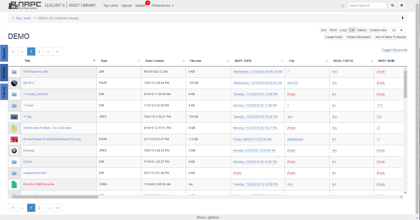
Xinet has been slow to add many new 'digital' formats to it's list of previewable file types – until recently. With Xinet's Video 4 module you get a lot of the new formats and it does a great job with HTML (see image above).

If you own Xinet already - it's a no brainer. If you don't it's still worth a look. I was very impressed with how quickly it displayed HTML previews and made them browsable and searchable in seconds. 

1 Comments Click here to read/write comments

Portal v3 - Markups and Annotations on your assets

Posted by Brian Dolan on Wed, Oct 07, 2009 @ 07:51 AM
Share on Facebook Facebook | Submit to Digg digg it |  Add to delicious  delicious |  Submit to StumbleUpon StumbleUpon |  Share on LinkedIn LinkedIn |  Share On Technorati Technorati | Submit to Reddit reddit 

Now that version 3 of Portal is out, the markup and annotations feature is available to those that upgrade.  Now, that doesn't mean go out and install it immediately people!  Always make sure to contact NAPC first before any upgrades and ya know what, we're here to install it for you any way!  So, back to my point.

Portal 3, annotations & markups, yeah that's right!.  It's a very cool feature that deserves it's own min-blog.

Let's make this easy . . . the notes below come directly from Xinet's release notes of Portal v3:

"WebNative Portal 3.0, in conjunction with WebNative 16.0, allows on-line annotations of all images, documents, and videos. A palette allows users to add text, boxes, stamps, or sketches, and all of the annotations can be done in black or a range of colors. When adding annotations, the preview can be magnified for closer inspection. Individual annotations may be saved (with or without comments), deleted, or temporarily hidden from view. The annotations are stored in the Venture database, so any other WebNative user may access saved annotations via mview in Portal but the annotations are not saved to the file on the file system."

If you'd like to see a demo of this, please contact your Account Manager so we can arrange a quick demo.  Just another reason to get Portal or upgrade to the latest version!

0 Comments Click here to read/write comments

How To Videos are HOT!

Posted by Kenny Kirsch on Wed, Jul 15, 2009 @ 10:21 AM
Share on Facebook Facebook | Submit to Digg digg it |  Add to delicious  delicious |  Submit to StumbleUpon StumbleUpon |  Share on LinkedIn LinkedIn |  Share On Technorati Technorati | Submit to Reddit reddit 

 (From the NY Times)

IN their star turns in James Bond movies, Ursula Andress and Halle Berry perfected the art of emerging from an ocean swim and walking onto the beach in a dripping-wet bikini.

Ruby Washington/The New York Times

Co-founders of the instructional Web site Howcast at its Manhattan office. From left, Daniel Blackman, Jason Liebman, Sanjay Raman and Darlene Liebman.

For everyone else? Not so easy. But there are some tricks for aspiring Bond girls, and they involve, among other things, waterproof mascara, Vaseline and double-sided tape. There are some finer points, too, to pull off such a feat, and words can’t quite convey their subtleties.

Sometimes — and this is a difficult sentence for a newspaper to print — it’s easier to learn from a video.

That notion led a handful of Google and YouTube veterans to start Howcast.com, and jump into the bustling and fast-growing crowd of Web sites offering how-to content.

Given the competition, from sites like Howdini and even YouTube, Howcast Media is betting that its particular blend of information and entertainment, presented in short and snappy video, will draw plenty of traffic and, most important, deliver a profit.

Certainly the demand is there. People like to watch videos, and, in a bad economy, the ranks of do-it-yourselfers and would-be MacGyvers are swelling.

Already, Howcast has 100,000 videos in its library, some that it has produced itself and many more from others like Playboy, Popular Science, Home Depot and the Ford modeling agency that share in the ad revenue.

The site offers instruction on a range of topics, from everyday issues — fixing a leaky faucet, creating a living will — to the more obscure, like how to survive a bear attack or how to have sex in a car. (Nothing on Howcast is particularly graphic. Plenty of other sites, of course, already offer that sort of stuff.)

Given the ease of posting on sites like YouTube, where 20 hours of video are uploaded each minute, it takes more than a bunch of short clips to succeed. Part of the trick to winning on the Web is having a distinct personality.

Some industry executives give Howcast credit for finding a way to stand out.

“They understand that video is an incredible medium to share and instruct,” says David Eun, a Google executive who oversees strategic partnerships. “But they also realize that they can use video to provide instruction in an environment that is entertaining, not dry.”

One of the biggest challenges for a site like Howcast, though, is the same one that has vexed old-school media giants and survivors of the dot-com boom: How can content creators turn a profit on the Web?

Howcast’s solution is to partner with advertisers and create instructional videos for their specific products or services.

Blurring the lines between editorial and advertising is a tricky endeavor, of course. Companies that try to be too stealthy or clever risk seeing their brand roasted on Facebook,Twitter and beyond.

“Users are sensitive to brands trying to muscle into what appears to be an organic social media environment,” says Nick Thomas, an analyst at Forrester Research. “Yes, I want to learn how to cook something, but do I necessarily want to be taught by someone who makes the ingredients?”

Howcast’s team of young executives argue that they can tap-dance along that fine line by making sure that any branding effort is in a supporting role, rather than a starring one, in its instructional videos.

They are even forging relationships with the State Department as it looks for ways to use social networks and other media to communicate directly with people around the world. Among the videos they’ve produced for it are “How to Protest Without Violence” and “How to Launch a Human Rights Blog.”

Howcast executives are also quickly signing deals with the likes of Google, Facebook and Hulu to spread their videos across the Internet.

“Being a media company today means you can’t exist inside a walled garden, just driving traffic to your own site,” says Jason Liebman, 33, Howcast’s chief executive. “You have to produce the content, distribute it all over the Web, develop the technology — all of which is hard to do. But you need to do everything in order to be successful today.”

SITTING in a stifling office loft in the SoHo neighborhood of Manhattan, with a couple of air-conditioners chugging away in vain, Jeffrey Kaufman runs through the topics that are particularly popular on search engines these days. The list includes werewolves. And manboobs.

Mr. Kaufman is the head of programming at Howcast, and is supposed to have his fingertips on the nation’s pulse through proprietary data-mining tools and information gathered from search engines.

Mr. Kaufman chalks up the werewolf craze to the coming movie “New Moon,” the second installment of the popular “Twilight” vampire series, based on the books by Stephenie Meyer.

Why manboobs? Everyone in the small room shrugs.

Then they have to figure out a how-to video spin on the topics (How to make a werewolf costume? How to get rid of manboobs?). The final consideration is whether the subject will attract advertisers or, better yet, a corporation would pay to have its product or service appear in the video.

The how-to category is big and growing, but extremely fragmented. And while Howcast, whose Web site is just 17 months old, is watching its traffic soar, it lags far behind eHow and About.com (owned by The New York Times Company), according to Hitwise, a research firm.

nth across all of its distribution network, including YouTube andApple’s iPhone. What may give Howcast a leg up on its competitors is the fact that the company is creating a library of high-quality content that could command higher ad rates, says Allen Weiner, an analyst at Gartner, the tech research firm.

Howcast

Among Howcast videos, “How to Create a Modern Day Scavenger Hunt."

Howcast

“How to Make a Fruit Smoothie.”

To help viewers navigate through the 100,000 videos on its site, Howcast divides them into 25 broad categories — such as technology, travel and food and drink — and then slices and dices those into smaller segments.

Viewers can rate the videos (a video teaching how to pick a lock rates disturbingly high). Videos on sex and relationships are among the most watched at the Howcast site. No. 1 is “How to Have Sex in a Car,” followed by “How to Use Twitter” and “How to Kiss Like Angelina Jolie.” (Ms. Jolie is not in the video; it features two women in their underwear kissing on a bed.)

Mr. Liebman, the executive overseeing this start-up, seems somewhat embarrassed about this playlist. He prefers to talk about the Howcast videos that are the most popular across all the sites that distribute the company’s content, including “How to Quit Smoking” and “How to Do the Moonwalk.”

Mr. Liebman was bitten by the start-up bug when he was 16 and started a newspaper — “it was profitable,” he says — for New York prep school students. In a 1992 article in The Daily News, he was described as the “picture-perfect model of the Privileged Prepster.”

After graduating from Duke with a degree in political science, Mr. Liebman migrated to Wall Street, where he spent some time as an investment banker in leveraged finance. Watching the dot-com run-up on the West Coast, however, he wanted to join the party. He packed his bags and took up residence on his twin sister’s couch in Los Angeles.

A couple of months later, he landed at a software start-up called Applied Semantics. There, he worked in sales and capital-raising while also overseeing a team of engineers that developed AdSense, software that matched advertisements to related content or text on a Web page. AdSense had been on the market for only a few months when, in 2003, Google acquired the company in a deal valued at $102.4 million. Mr. Liebman returned to New York to work from Google’s offices there.

Much of his time at Google, particularly after the 2006 acquisition of YouTube, was spent persuading sometimes stubborn media companies to post clips of their shows or movies on its site.

Other members of the Google video team included Daniel Blackman, a sales and business development executive with a broad background in digital media, and Sanjay Raman, anM.I.T. graduate who started his first software company in college and later was an analyst at Morgan Stanley.

Over time, the group noticed a surge in search traffic for instructional videos at Google and YouTube.

“We were seeing user-generated content getting millions and millions of hits,” Mr. Blackman says, “and it would be nothing more than a guy in his dorm room showing you how to tie a tie with a simple Webcam.”

The growing interest in how-to videos parallels what happened in the early days of video, says Mr. Weiner, the Gartner analyst.

“Things like the Jane Fonda video that showed people how to exercise was a big blockbuster,” he notes.

Other sites were building business models around simple instructional homemade videos, but Mr. Blackman and his team saw flaws in their strategy.

The quality of footage and content was uneven. The pedigree of the individual “experts” was unclear. And advertisers sometimes balk at homemade videos, citing concerns about who owns the rights to the content, Mr. Blackman says.

The three friends left the comfortable confines of Google in May 2007 and set off on their own.

Most large venture capital firms are loath to back start-ups without seeing some content or a mockup of the site. So Howcast’s founders bankrolled the company’s first batch of videos, producing them on the cheap.

For that, Mr. Liebman invited his twin sister, Darlene Liebman, to come on board as another co-founder. Ms. Liebman had spent a decade in television and film, working on shows like “Nash Bridges,” “Queer Eye for the Straight Guy” and video clips for Nickelodeon.

Ms. Liebman’s marching orders were to create 400 how-to videos in two months.

“That’s like boiling the ocean; I thought he was absolutely insane,” Ms. Liebman said. They set up a small studio in the back of their office and called on family, friends and even employees to appear in some of the early videos.

Another one of Mr. Liebman’s sisters, a dermatologist, was enlisted for a video on how to spot skin cancer. The company also sought out local experts, bringing in the head chef from the restaurant Sushi Samba for a video on how to make sushi.

To build its library even faster, Howcast started offering aspiring filmmakers $50 to shoot two- to three-minute videos. The practice continues: Besides getting a chance to show off their skills to a large audience, they also get a percentage of the ad revenue if their video is a hit.

The videos produced by Howcast follow a set format, using quirky music, graphics and voiceovers, which make the videos easier to translate into different languages. Howcast even built its own media player with slow-motion and zoom-in features.

With the company’s beta site running, Mr. Liebman started hunting for venture capital last fall. Thanks in part to the résumés of the Howcast founders, they quickly raised $10 million from the Tudor Investment Corporation and tech insiders like Tim Armstrong, who was recently named chief executive of AOL, and Jason Hirschhorn, recently named chief product officer at MySpace.

“What we liked was the fact that there’s endless content,” notes Kevin Law, a former music executive who is now an investment consultant to Tudor and serves on Howcast’s board. “There’s a how-to that can go along with any service, any product.”

Building up a library of content is relatively easy, says Rupert Ashe, the chief financial officer of Videojug in Britain, which went live in 2006 and now has 100,000 how-to videos.

“The thing that is difficult to get and takes many, many years to build up is a following and traffic to the site and a place in the search-engine constellation,” Mr. Ashe says.

The space hasn’t yet seen a “mega-breakout site,” says Mr. Thomas of Forrester Research. But over time, he says, one or two sites will inevitably emerge as dominant players, and many others will fade away.

IN the middle of last year, the food company Nestlé noticed a peculiar spike in complaints from consumers in a Middle Eastern country about the taste of one of its products, the instant coffee Nescafé Gold.

After some sleuthing, the company discovered that people in that country — Nescafé wouldn’t say which one — didn’t understand how to make its instant coffee. They were making it like traditional ground coffee, said Rakan Brahedni, a new-media relationship specialist for Nestlé in Dubai.

Mr. Brahedni, who says he had “fallen in love” with Howcast’s site, particularly its cooking videos, was already in discussions with the start-up to add videos to Nestlé’s Web site.

So Howcast quickly produced a video showing how to make Nescafé Gold. The graphics, subtitles and voiceover were done in both English and Arabic.

“This was very much out-of-the-box for us, and now we’re seeing a lot of excitement from other brands” inside the company, Mr. Brahedni says. The video will soon appear on a Nescafé Web site, and Howcast will distribute it to some of its partners.

In this light, Howcast may look like more of an advertising agency than a media company. Unlike pricey ad agencies, however, that can charge hundreds of thousands of dollars for a 30-second advertising spot, Howcast produces videos for corporate customers at a fraction of that cost. Its executives say this is its entree into big corporate ad budgets.

And they argue that they are still sticking with their primary focus: to create instructional content.

When JetBlue Airways planned its inaugural flight from Kennedy Airport in New York to Los Angeles International earlier this year, it turned to Howcast to create videos for the occasion.

The result was a series of clips, including “How to Stay Fabulous When You Fly Coast to Coast,” featuring Delphine, a leggy Ford model with her own YouTube following. The video can be found on numerous sites, including Yahoo, AOL, MySpace and Metacafe.

JetBlue executives say they are thrilled with the response from the spots and plan to work with Howcast again. “What Howcast offers is something that is very cost-effective and very targeted,” said Morgan Johnston, a JetBlue spokesman.

Howcast executives see opportunities beyond corporate America. They’re hoping to get more work from the federal government.

So far, they’ve worked mostly with the State Department in its “Public Diplomacy 2.0” initiative to use new media to communicate, says James K. Glassman, a former under secretary of state for public diplomacy.

“What we saw in Iran is that the private sector played a very important role in disseminating information there,” Mr. Glassman says. “Companies like Twitter and Facebook facilitated a lot of the activity in Iran.”

In April, Mr. Liebman traveled to Iraq with a delegation from several tech companies on a trip arranged by the State Department to offer guidance on how new technologies could be used in the country. Howcast is also working on a project for the Defense Department.

Mr. Liebman says the company is willing to “turn over lots of different stones” in its search for profits.

HOWCAST enjoyed a break-out moment earlier this year, thanks to a five-second cameo appearance as one of the featured applications in a television ad for the iPhone. Downloads for Howcast’s iPhone application jumped from around 1,000 a day to 24,000 at its peak.

People who download Howcast.com onto their iPhone spend an average of 12 minutes on the site each time they visit, twice the amount of time spent watching from their computers, says Mr. Raman, Howcast’s head of product development. “That tells me that this is going to be a huge platform for us,” he says.

In the meantime, Howcast is exploring ways to distribute its content on other mobile devices and developing features so customers can buy items they see in the clips.

The company will probably need to do another round of financing in coming months. But Mr. Liebman is projecting that Howcast could be profitable by late next year.

If he’s right, the company could become the star of a new instructional video: “How to Create a Profitable Start-Up.” 

0 Comments Click here to read/write comments

New Video featues in Xinet v16

Posted by Brian Dolan on Fri, Jul 03, 2009 @ 07:29 AM
Share on Facebook Facebook | Submit to Digg digg it |  Add to delicious  delicious |  Submit to StumbleUpon StumbleUpon |  Share on LinkedIn LinkedIn |  Share On Technorati Technorati | Submit to Reddit reddit 

As the Holiday weekend starts up for us all, lets close the week out and chat a bit about all the cool things that are coming to the masses soon.  Xinet is going to be releasing version 16 of it’s suite of tools including a new, faster version of Portal, a unified web interface for all administration, easier tools and setup for PDF Image replacement, greatly enhanced video capabilities, basic web based markup and annotation tools and a whole bunch of other “under the hood” improvements.  Currently, NAPC is testing beta 2 of version 16 and we’re all pretty impressed with it so far.  One of the biggest features I’m excited about is the enhanced video features.  Let me esplain (as Ricky would say).


Xinet, in the new soon to be released version of video in Suite 16, has greatly enhanced how users in Portal interact with video assets.  In the current release of Video 2.0 in Xinet, it is possible to stream many video formats, create keyframes at a preset interval, and really, thats about it.  With the new version, you’ll be able to do much, much more.  First and foremost, the ability to create what I would call mini-reels, is now available as a basket plugin in Portal.  This is how it works:


1)    User logs in to a Portal site and identifies the files they want to work with.  Those files could be video files of various formats, InDesign files, static picture files, just about anything you can have in Xinet.
2)    The user would then add those files to a shopping basket.
3)    Once in the basket, the user would click the basket plugin named “Video Generation”
4)    This brings up a new Web 2.0 type of interface to arrange the assets into whatever order makes sense to the end user.  Asset arrangement is made simple by using drag and drop in a web browser-me likey!
5)    Once in the correct order, the user can set the ‘in and out’ times of the files based on keyframes generated by Xinet or by hours:minutes:seconds.
6)    The user can also set basic fade outs from clip to clip as well.  Gives it a nice touch!
7)    Once the files are arranged in the correct order and the in/out times are set, a new video file can be generated from those assets in either a Quicktime, Windows Media, or Flash format.
8)    The server then generates the appropriate file on the Xinet file system and once done, it gives the end user the ability to download the file to their desktop.

Here's a peek of what it'll look like:


This is huge everyone.  Think of it this way, if you have 30 second spots for a client for all of 2008, and they want to create a quick reel of all the ones that won awards (that you made of course!), they can quickly log in to Xinet via Portal, collect the assets, set the times and format and let Xinet make the file for them.  To be clear, this is not intended for broadcast but more for the web or computer screen aka small screen.  I think this is a huge leap forward for Xinet and since I used to work in the broadcast world, it’s pretty exciting for me as you might be able to tell!

On top of that, screen detection for keyframing is also part of the new release.  The current version can be set to sample a keyframe at a set interval say every 5 seconds or so regardless of scene change or not.  That can potentially add a bunch of useless keyframes into your database.  With the new scene detection functionality, you can set the admin preferences so it is “smart” and only creates keyframes when a scene actually changes with tolerance controls.  So, instead of keyframing a movie that is 1 minute long and getting 12 keyframes (when sampled every 5 seconds), you may only get 7 or 8 frames stored in the database. This can be very helpful!

Overall, we have a lot to look forward to with the upcoming release of version 16 of Xinet’s Suite of tools.

Enjoy the weekend all and as always, if you have any questions on any of this information, please give us a ring and we’ll be happy to help!  Want to see this new functionality for yourself???  Give your Account Manager a call and we’ll be happy to show you all the new stuff.

Happy 4th of July!

Brian Dolan

0 Comments Click here to read/write comments

10Gb networking and DAM

Posted by Rob Pelmas on Wed, Jun 03, 2009 @ 08:56 AM
Share on Facebook Facebook | Submit to Digg digg it |  Add to delicious  delicious |  Submit to StumbleUpon StumbleUpon |  Share on LinkedIn LinkedIn |  Share On Technorati Technorati | Submit to Reddit reddit 

We're a bunch of performance geeks here. We've been tweaking blocksizes, stripe, and interleave settings on disk since SGI first gave you access to 'em. Tuning and re-tuning SWAP size, location, type is in our blood. A few percentage points here, double digit gains there, all without more capex. Gotta love it.

Now, anytime a paradigm shift in technology comes out there's a steep cost differential to it, right? 10Gb networking had only a tiny little blip of time when it was out of reach of the masses, which is a refreshing change. You can kit out most servers with a card, an acceptable managed switch with a 10Gb port or two, for a very reasonably cost.

Why go to 10? Our desktops have had Gb cards for what seems like forever, and very fast CPUs. With just a couple 'power' users you could swamp the networking capabilities of a server. Of course, a handful of years ago disks could only cough up 150Mb/sec or so of sustained data, so network tended to not be the gating factor in server  performance. Modern disk starts at well over 300Mb/sec, and if you stripe or otherwise use some common sense design principles you can achieve multiples of that.

 Xinet and NAPC both use the 1 to 6 rule for users and performance: with 6 retouchers (or 'power' users), you can assume 1 of them will be accessing the server at one time. 12=2, 18=3. It's a rough rule of thumb, but one that seems to stand up over time. 12 heavy hitters can thus drain 120Mb/sec out of a server, which is the better part of 2 1Gb cards bonded together. Add in the other users, doing layout, OPI printing (yep, some folks still use an OPI workflow), and Portal access, you've got a saturated pipe. 10gb gives you a good 800mb/sec of access speed, which will sate all but the most demanding organizations needs for data.

Next of course, we can talk about teaming 10Gb interfaces! (insert evil chortle of delight here).


2 Comments Click here to read/write comments

Find Similar

Posted by Grant Mongardi on Tue, May 12, 2009 @ 04:21 PM
Share on Facebook Facebook | Submit to Digg digg it |  Add to delicious  delicious |  Submit to StumbleUpon StumbleUpon |  Share on LinkedIn LinkedIn |  Share On Technorati Technorati | Submit to Reddit reddit 
Presently, Xinet and many other DAM systems offer reasonably
elaborate ways of finding images based upon both user-supplied
metadata, as well as information provided by the applications
used to create the images. Much of this searching is reliant
upon some level of understanding and expertise by the end user.
This method of searching is generally only as good as the people
both adding the metadata, as well as the folks doing the search.
In other words, the search method itself is very dependent upon
people for it's accuracy.

That may change sometime in the future. Although I have no
expectations that searching user-applied metadata will ever go
away entirely, I do suspect that other options will be forth-
coming that will allow end-users to search based upon the
characteristics of an image. Most images have some sort of
general theme, be it either subject matter, layout, color or
texture. If you can determine these characteristics algorith-
mically, or some combinations of heuristic and algorithmic
techniques, then it would be possible to search initially on
metadata (or simple browse to a particular image to start with)
and then select a defined mechanism to find "similar images"
within some threshold to the reference image. Additionally,
there is also the capability that you can simply upload an
image from your desktop, either existing artwork, or just some
reasonable facsimile drawing that you produce, and let the
search engine find stuff that is similar!

There are already a few of these search engines out there. They
are in very early stages of development, so you can't really use
these as a definition of what's to come, but the results that
they produce are interesting to say the least. From the time
that I've spent looking at these, my suspicions are that most
are initially using a combination of information applied to the
images, either via information provided by the page that they
are placed within, or some sort of metadata/tags provided to
describe the images. From that point, the display of images
offers some mechanism to find images that have characteristics
similar to the reference image - some sort of "find similar"
link or button.

The benefit to this sort of search capability for the typical
DAM administrator is that although metadata searches with still
need to be available, designers will then be able to "find
similar" imagery based upon a texture, or color theme, or
content layout, or even some combination of those with perhaps
some specific metadata, such as "royalty-free". Given the fact
that most designers think and work visually, this will make
reuse of imagery much more productive, and will allow studios
to make the most of their asset library.

If you'd like to see some of these engines in action, or if you
are interested in learning more about the science behind them,
I've provided some links at the end of this article. However,
I wouldn't expect to see these anytime soon on your DAM server,
regardless of who makes it. The technology behind this sort of
searching is truly in it's infancy, and my expectation would be
that it will still need a lot of fine-tuning before we'll ever
see it in a commercial environment such as Xinet provides.
Although, one should note that the fact that Xinet's system
creates and stores previews of a large array of filetypes, this
then adds the capability for one to search across those preview
images rather than just the original image. That adds a layer
of capability that will allow the end-user to not just compare
actual original images, but to compare the previews of all of
the supported filetypes. That means you can find an InDesign,
Quark, or even Word document with similar characteristics to
what could be a reference PSD, or even Vector-based AI file.
Stay tuned, as the future of image similarity searching does
look bright!

Similarity search engines:
 http://www.airliners.net/search/
 http://similar-images.googlelabs.com/
 http://www.tiltomo.com/
 http://tineye.com/
 http://www.incogna.com/#random
 http://wang14.ist.psu.edu/cgi-bin/zwang/regionsearch_show.cgi

Academic Papers on Similarity Searching:
 http://infolab.stanford.edu/~wangz/project/imsearch/SIMPLIcity/TPAMI/
 http://www.cs.princeton.edu/cass/papers/LCL04.pdf

2 Comments Click here to read/write comments

All Posts